---
title: Roles and Permissions
description: Learn how to assign roles and understand their corresponding permissions.
---
[Skip to content](https://help.thirst.io/roles-and-permissions#main-content)
English
Show submenu for translations
![1f613ec134bc17877e144c3a22fc3808.png\]](https://help.thirst.io/hs-fs/hubfs/1f613ec134bc17877e144c3a22fc3808.png?height=40&name=1f613ec134bc17877e144c3a22fc3808.png)
Open main navigation
Close main navigation
- English
Show submenu for translations
- Go to thirst.io
Go to thirst.io
How Can We Help?
- There are no suggestions because the search field is empty.
1. [Help Centre](https://help.thirst.io/?hsLang=en)
2. [Set Up Your Organisation](https://help.thirst.io/set-up-your-organisation?hsLang=en)
# Roles and Permissions
## Learn how to assign roles and understand their corresponding permissions.
### Getting Started
Roles in Thirst dictate user permissions within the platform. Let's dive in and learn how to assign roles and understand their corresponding permissions.
### Understanding Roles
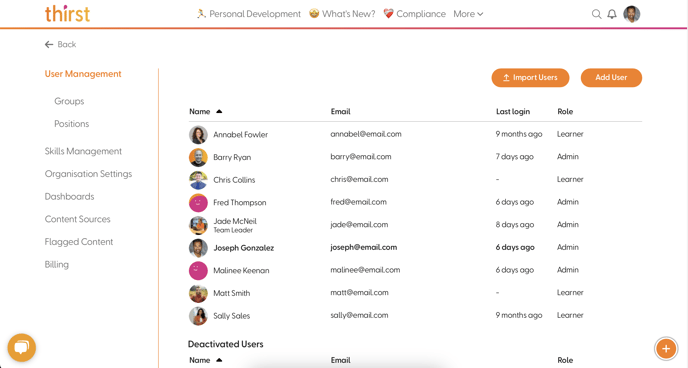
Roles determine the level of access and permissions granted to users in Thirst. Here's an overview of the three standard roles:
- **Admin**: Full access to all platform features and settings.
- **Manager**: Limited access with permissions tailored for managing groups and skills.
- **Learner**: Basic access for learning and consuming content.
Group Leaders possess additional permissions beyond their standard role. See our documentation on Groups or reach out to our support team for more information.
### Permissions
Here's a breakdown of permissions for each standard role:
| | Admin | Manager | Learner |
| --- | --- | --- | --- |
| Access analytics | ✅ | ✅ | ❌ |
| Manage skills | ✅ | Limited\* | ❌ |
| Manage groups | ✅ | ✅ | ❌ |
| Manage users | ✅ | ❌ | ❌ |
| Manage and assign positions | ✅ | ❌ | ❌ |
| Manage organisation settings | ✅ | ❌ | ❌ |
| Manage billing | ✅ | ❌ | ❌ |
| Manage flagged content | ✅ | ❌ | ❌ |
| Manage content sources | ✅ | ❌ | ❌ |
| Manage any content item | ✅ | ❌ | ❌ |
\*Managers can add and edit skills they created, but cannot remove skills or edit skills added by others.
### Assigning Roles
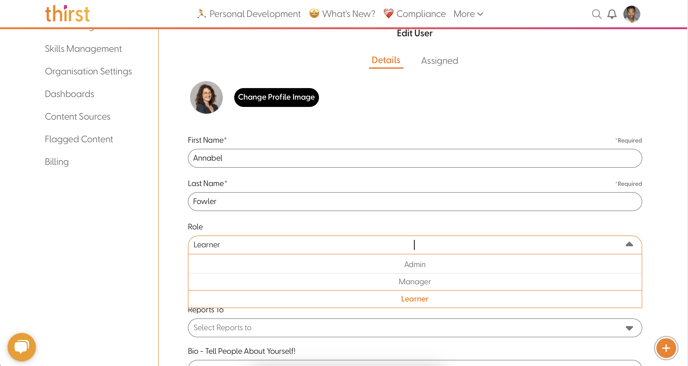
Roles can be assigned via the following steps:
1. Navigate to "Manage Users" in the admin settings.
2. Select the relevant user.
3. Use the dropdown menu to assign the desired role.
Understanding roles and their corresponding permissions is crucial for effective user management in Thirst. By assigning roles appropriately, you can ensure users have the access they need to fulfill their roles within the platform.
- [Getting Started](https://help.thirst.io/getting-started?hsLang=en)
- [Set Up Your Organisation](https://help.thirst.io/set-up-your-organisation?hsLang=en)
- [ThirstAI](https://help.thirst.io/thirstai?hsLang=en)
- [Create and Manage Content](https://help.thirst.io/create-and-manage-content?hsLang=en#main-content)
- [Creating Content](https://help.thirst.io/create-and-manage-content?hsLang=en#creating-content)
- [Interacting with Content](https://help.thirst.io/create-and-manage-content?hsLang=en#interacting-with-content)
- [Assessments](https://help.thirst.io/create-and-manage-content?hsLang=en#assessments)
- [Events](https://help.thirst.io/create-and-manage-content?hsLang=en#events)
- [Images](https://help.thirst.io/create-and-manage-content?hsLang=en#images)
- [Quizzes](https://help.thirst.io/create-and-manage-content?hsLang=en#quizzes)
- [Learning Journeys](https://help.thirst.io/create-and-manage-content?hsLang=en#learning-journeys)
- [Manage Your Settings](https://help.thirst.io/manage-your-settings?hsLang=en)
- [Develop Your Skills](https://help.thirst.io/develop-your-skills?hsLang=en#main-content)
- [Skills Knowledge Check](https://help.thirst.io/develop-your-skills?hsLang=en#skills-knowledge-check)
- [Track and Measure Engagement](https://help.thirst.io/track-and-measure-engagement?hsLang=en)
[](https://help.thirst.io/?hsLang=en)
thirst Help Centre
Copyright © 2026, Thirst Learning Ltd