---
title: Review a Skills Knowledge Check
description: Understand how managers can verify and approve/reject learners' submitted knowledge checks.
---
[Skip to content](https://help.thirst.io/review-a-skills-knowledge-check#main-content)
English
Show submenu for translations
![1f613ec134bc17877e144c3a22fc3808.png\]](https://help.thirst.io/hs-fs/hubfs/1f613ec134bc17877e144c3a22fc3808.png?height=40&name=1f613ec134bc17877e144c3a22fc3808.png)
Open main navigation
Close main navigation
- English
Show submenu for translations
- Go to thirst.io
Go to thirst.io
How Can We Help?
- There are no suggestions because the search field is empty.
1. [Help Centre](https://help.thirst.io/?hsLang=en)
2. [Develop Your Skills](https://help.thirst.io/develop-your-skills?hsLang=en)
3. [Skills Knowledge Check](https://help.thirst.io/develop-your-skills?hsLang=en#skills-knowledge-check)
# Review a Skills Knowledge Check
## Understand how managers can verify and approve/reject learners' submitted knowledge checks.
#### Review Process
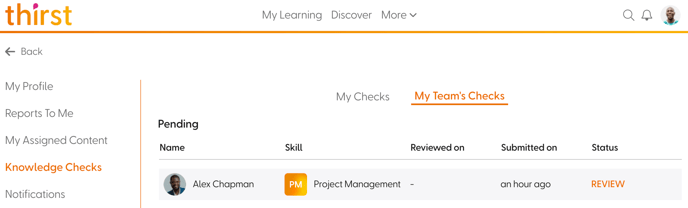
Line managers will receive a notification when a learner they manage submits a knowledge check.
1. Go to **Me & My Team \> Knowledge Checks \> My Team’s Checks**
2. Click **Review** to:
- Read the learner’s explanation
- View **Completed Content** linked to the skill
- Accept (optionally provide reason) or Reject (mandatory reason)
Admins can also review Knowledge Checks if required. For more information on this, view [**Skills Knowledge Checks**](https://help.thirst.io/skills-knowledge-check?hsLang=en).
#### Reviewed Checks
Manager's can click the right facing **arrow icon** to open the Knowledge Check submission in read-only mode.
- You’ll see tabs for:
- Submission
- Completed Content
- Feedback (after decision)
Managers cannot re-review already accepted/rejected checks.
**No Line Manager?** Learner's without a line manager will have their submissions automatically approved by "ThirstBot".
- [Getting Started](https://help.thirst.io/getting-started?hsLang=en)
- [Set Up Your Organisation](https://help.thirst.io/set-up-your-organisation?hsLang=en)
- [ThirstAI](https://help.thirst.io/thirstai?hsLang=en)
- [Create and Manage Content](https://help.thirst.io/create-and-manage-content?hsLang=en#main-content)
- [Creating Content](https://help.thirst.io/create-and-manage-content?hsLang=en#creating-content)
- [Interacting with Content](https://help.thirst.io/create-and-manage-content?hsLang=en#interacting-with-content)
- [Assessments](https://help.thirst.io/create-and-manage-content?hsLang=en#assessments)
- [Events](https://help.thirst.io/create-and-manage-content?hsLang=en#events)
- [Images](https://help.thirst.io/create-and-manage-content?hsLang=en#images)
- [Quizzes](https://help.thirst.io/create-and-manage-content?hsLang=en#quizzes)
- [Learning Journeys](https://help.thirst.io/create-and-manage-content?hsLang=en#learning-journeys)
- [Manage Your Settings](https://help.thirst.io/manage-your-settings?hsLang=en)
- [Develop Your Skills](https://help.thirst.io/develop-your-skills?hsLang=en#main-content)
- [Skills Knowledge Check](https://help.thirst.io/develop-your-skills?hsLang=en#skills-knowledge-check)
- [Track and Measure Engagement](https://help.thirst.io/track-and-measure-engagement?hsLang=en)
[](https://help.thirst.io/?hsLang=en)
thirst Help Centre
Copyright © 2026, Thirst Learning Ltd